Accessor
Say “twenty-nine”, hear a gentle chime, and talk to your agent. Accessor keeps speech recognition local, manages the conversation and terminal display, and reuses the agent’s tools and account connections.




Get started · Architecture · Full README
What it is
Accessor is a local voice shell around the command-line coding agents you already use. It owns the microphone, wake/sleep, speech synthesis, the dashboard, routing, and shared memory; each agent harness keeps its own tools, sandbox, and native conversation thread.
- Local by default. Wake detection, conversation speech recognition, and the default voice run on this machine with no API key. Cloud transcription and speech (Cartesia) are opt-in.
- Harness-agnostic. Codex App Server, Claude Code, Antigravity, opencode, and Cursor, plus a mock mode that needs no account.
- One conversation, many roles. A lightweight main agent can delegate coding and connector work to isolated workers, then return a bounded result.
- Durable context. Shared memory, notes, alarms, scheduled tasks, watches, and notifications persist across harnesses and restarts.
- Reviewable and reversible. Passwords, permissions, desktop control, and event handling are explicit and off unless you turn them on.
The voice pipeline
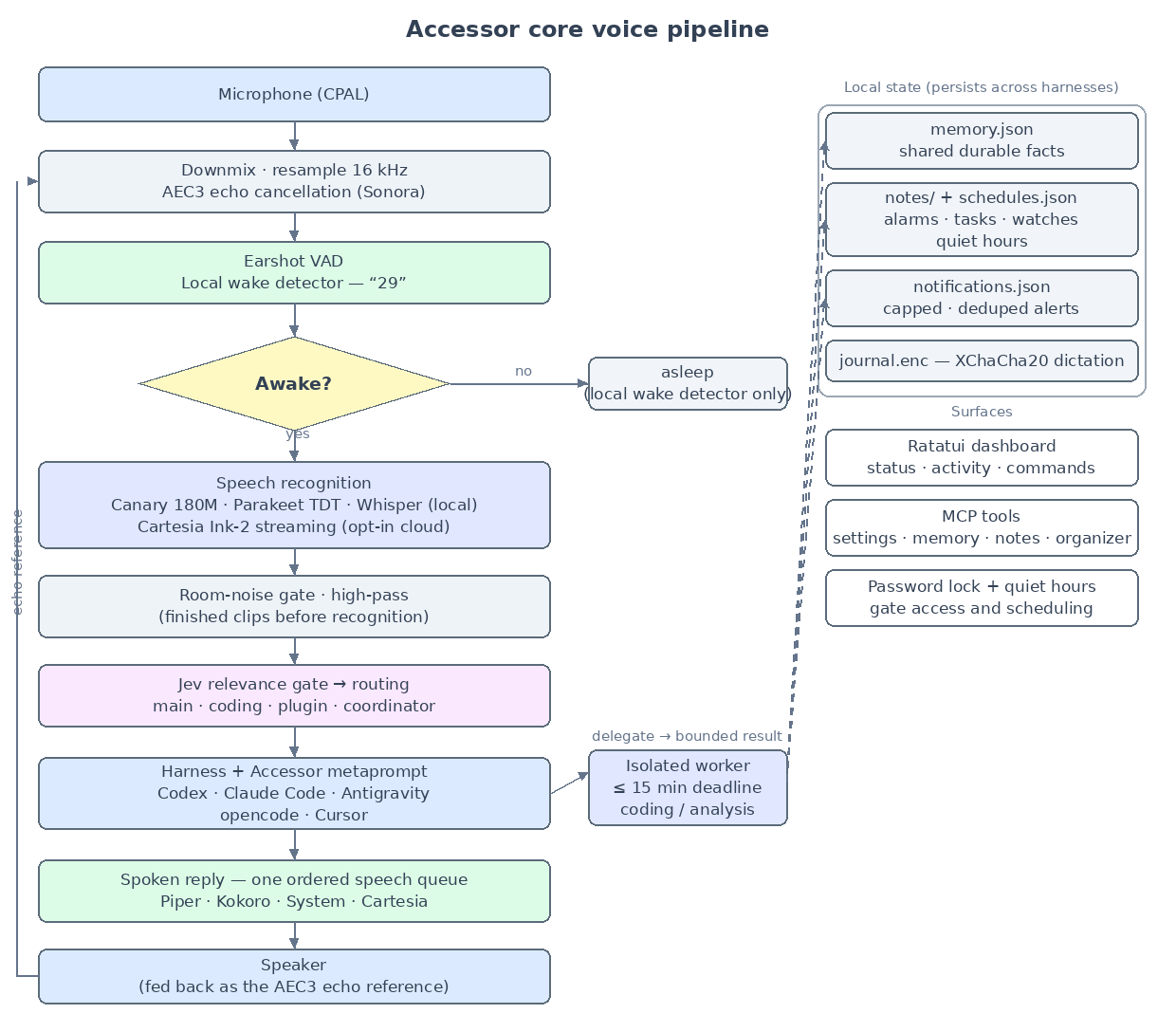
Editable source: docs/diagrams/29.dot;
regenerate with Graphviz dot. See Architecture for more
diagrams.
Install
Prebuilt binaries for Windows x64, Linux x64/ARM64, and Apple Silicon macOS are on the releases page.
# Linux and Apple Silicon macOS
curl -fsSL https://raw.githubusercontent.com/T-Lind/accessor/main/scripts/install.sh | sh
# Windows x64 (PowerShell)
irm https://raw.githubusercontent.com/T-Lind/accessor/main/scripts/install.ps1 | iex
Then start it:
acc doctor
acc -wakecode 29 speak
The first run downloads ONNX Runtime and the default Canary speech model (and the pinned Piper engine plus a voice) into Accessor’s assets folder. No Python is needed for the default path. See Getting started for platform prerequisites and a first-run walkthrough.
Explore the docs
| Guide | What’s inside |
|---|---|
| Getting started | Install, first wake, controls, and CLI basics |
| Features | Speech, routing, memory, organizer, notifications, computer use |
| Architecture | Pipeline, routing, memory, and security diagrams |
| Configuration | Portable vs device settings, key reference |
| Harnesses | Supported agents, roles, connectors, and MCP |
| Troubleshooting | Common install, audio, and platform problems |
| Releases | Versioning, artifacts, and how updates work |
| Local access lock | Password boundary, spoken unlock, and recovery |
| Platform notes | Overflow, Jev routing, and per-OS detail |
| Voice performance | Measured latency and deployment priorities |
Requirements
Windows x64 is the tested development platform. Linux x64/ARM64, Apple Silicon macOS, and Windows ARM64 use cross-platform libraries but need testing on actual hardware. See Getting started for the Linux build packages and per-OS notes.